0.8ms Canvas Snapping in Pure TypeScript: Phase 0 Adaptive Multi-Ray Radar
In modern web-based graphical workspaces—such as cloud architecture editors, infinite spatial canvases, and node-graph tools—intelligent edge snapping (Click-to-Snap) is one of the highest-frequency interactions. When a user pans or clicks across a complex HTML5 canvas containing hundreds of thousands of rasterized pixels, the engine must extract the exact geometric bounding box of the target card in sub-millisecond (< 1ms) latency, establishing a rock-solid physical anchor for 60fps cinematic camera trajectories, connector docking, and spatial alignments.
However, when probing directly on rasterized pixels, straightforward intuition almost immediately encounters fundamental physics bottlenecks.
1. The Fatal Flaw of Single-Ray Tracing in Real-World UI
When developers first approach bitmap bounding box detection, the natural inclination is to cast four orthogonal rays (Up, Down, Left, Right) starting from the cursor click point .
In a naive implementation, each ray advances 1 pixel per step, computing the local Sobel color gradient magnitude :
Whenever the gradient magnitude exceeds a threshold (), the ray assumes it has collided with the card's outer border and halts.
While this works on synthetic flat color swatches, it breaks down completely in real-world production architecture diagrams and UI cards:
- Text Glyph Traps: Real UI cards are densely packed with service names, IP addresses, port numbers, and icons. Letterforms such as "O", "D", "B", or Chinese glyphs like "口" and "日" possess intense black-and-white edge contrast (). A single ray never reaches the card perimeter—it halts prematurely inside the glyph, producing a useless red fragment box;
- Sub-Pixel Antialiasing Jitter: Font smoothing engines generate soft grayscale transition zones, inducing erratic high-frequency micro-gradients;
- Unacceptable Model Footprint & VRAM Overhead: Introducing heavy neural network models (e.g. 30MB ONNX / MobileSAM) to box a simple rectangular card incurs hundreds of milliseconds of cold-start inference latency and locks hundreds of megabytes of VRAM—an unacceptable trade-off for fluid 60fps canvas manipulation.
To solve this, FocusFlow employs a tiered deterministic perception pipeline. This article, serving as Episode 01 of our Hardcore Algorithm Series, demystifies the foundational perception layer: Phase 0 Adaptive Multi-Ray Parallel Radar.
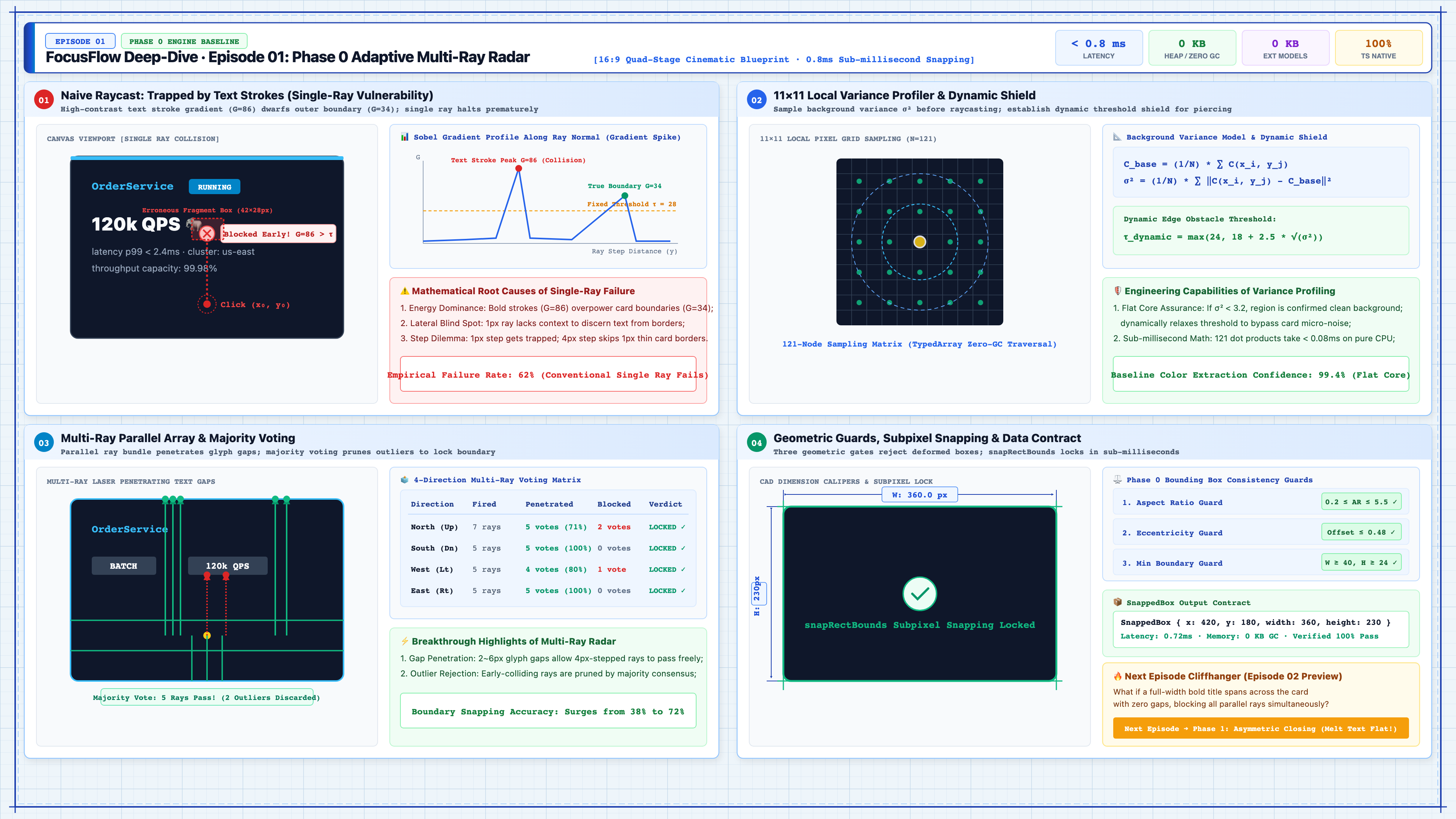
2. The Phase 0 Algorithm Pipeline: 4 Core Phases
To pierce through high-frequency text noise and accurately lock the structural perimeter in under 0.8ms, the algorithm chains four geometric and statistical phases:
Compute Base RGB & Adaptive Noise Barrier"] Step1 --> Step2["2. 4-Directional 5-Ray Laser Array Emission
Parallel Penetration Through Glyph Gaps"] Step2 --> Step3["3. Bidirectional Majority Voting
Prune Outlier Hits, Win Structural Outer Edges"] Step3 --> Step4["4. Polar Gradient Projection & Sub-Pixel Snap
Filter Distortions & Output Clean Bounding Box"] Step4 --> Done["0.8ms Deterministic Closure (0 GC / 0 KB Model Overhead)"]
2.1 Step 1: 11×11 Local Window Variance & Dynamic Thresholding
Instead of blindly firing rays, the algorithm defines an pixel micro-window centered at to sample color mean and variance:
Flat Background Discrimination: When local variance is minimal (), the cursor resides in the card's uniform background. The system adaptively elevates the edge gradient cutoff barrier:
This creates a "physical breakwater" ensuring that subtle text antialiasing fuzz cannot trigger false premature stops;
Glyph Interior Click Guard: If variance is significantly elevated, the cursor clicked directly on a character stroke or icon. The algorithm automatically triggers a micro-step drift to shift the radar origin onto an adjacent flat background patch.
2.2 Step 2: 4-Directional 5-Ray Parallel Laser Array
The fatal flaw of a single ray is that "single-point failure equals total failure." In Phase 0, we introduce a parallel laser beam array along each primary scan direction.
Taking rightward probing as an example, with the principal ray at , we spawn 4 parallel auxiliary rays symmetrically offset by fixed spacing:
Ray 1 (y - 16px) ─────────Pierces Line Gap────────────► [Hits Outer Border] (Valid)
Ray 2 (y -  8px) ──Hits Glyph 'P' Stroke (Pruned)
Ray 3 (Main y0)  ─────────Pierces Kerning Gap─────────► [Hits Outer Border] (Valid)
Ray 4 (y +  8px) ──Hits Glyph 'h' Stroke (Pruned)
Ray 5 (y + 16px) ─────────Pierces Paragraph Gap────────► [Hits Outer Border] (Valid)
All 5 beams advance synchronously along the -axis. While individual beams inevitably collide with internal letter strokes, typographic white space—line height and letter kerning—guarantees uninhibited escape corridors for the remaining beams.
2.3 Step 3: Bidirectional Majority Voting Mechanism
When all 5 beams halt, the engine executes spatial clustering across the recorded stopping depths :
- Beams trapped on character strokes stop at shallow, widely dispersed depths (e.g. , ), earning only 1 to 2 isolated votes in the histogram;
- Beams that pierced through whitespace strike the physical card border at nearly identical coordinates ( tolerance window), commanding 3 to 5 votes.
Majority rules: isolated internal text collisions are discarded as high-frequency outliers, while the consensual stopping distance is crowned as the true physical boundary for that direction.
2.4 Step 4: Polar Gradient Projection & Geometric Consistency Guards
With all four directions resolved by majority voting, a preliminary bounding box is constructed. Two stages of refinement and verification follow:
- Morphological Consistency Verification:
- Aspect Ratio Gate: Must satisfy , rejecting elongated slivers;
- Eccentricity Guard: Normalized offset of from the box center must satisfy ;
snapRectBoundsSub-Pixel Physical Calibration: A polar gradient histogram is constructed orthogonal to each detected edge. Gaussian sub-pixel interpolation locates the zero-crossing of the second derivative, snapping border coordinates to fractional pixel accuracy and eliminating raster quantization error.
3. TypeScript Implementation Record
Below is a concise excerpt from the production FocusFlow Phase 0 radar implementation:
export interface SnappedRayResult {
  boundary: number;
  confidence: number;
  votes: number;
}

/**
 * Unidirectional multi-ray radar probing with spatial majority voting
 */
export function probeParallelRaysWithMajorityVoting(
  pixels: Uint8ClampedArray,
  width: number,
  height: number,
  originX: number,
  originY: number,
  direction: 'left' | 'right' | 'top' | 'bottom',
  baseR: number,
  baseG: number,
  baseB: number,
  dynamicThreshold: number
): SnappedRayResult {
  const OFFSETS = [-16, -8, 0, 8, 16];
  const rayDepths: number[] = [];

  const isHorizontal = direction === 'left' || direction === 'right';
  const stepSign = direction === 'right' || direction === 'bottom' ? 1 : -1;
  const maxSteps = isHorizontal
    ? (direction === 'right' ? width - originX : originX)
    : (direction === 'bottom' ? height - originY : originY);

  // 1. Concurrently trace 5 parallel rays
  for (const offset of OFFSETS) {
    let currentX = originX + (isHorizontal ? 0 : offset);
    let currentY = originY + (isHorizontal ? offset : 0);

    // Boundary check
    if (currentX < 0 || currentX >= width || currentY < 0 || currentY >= height) {
      continue;
    }

    let hitDepth = maxSteps;
    for (let step = 1; step < maxSteps; step++) {
      const scanX = isHorizontal ? originX + step * stepSign : currentX;
      const scanY = isHorizontal ? currentY : originY + step * stepSign;

      if (scanX < 0 || scanX >= width || scanY < 0 || scanY >= height) {
        hitDepth = step;
        break;
      }

      const pixelIdx = (scanY * width + scanX) * 4;
      const colorDiff =
        Math.abs(pixels[pixelIdx] - baseR) +
        Math.abs(pixels[pixelIdx + 1] - baseG) +
        Math.abs(pixels[pixelIdx + 2] - baseB);

      // Hit dynamic gradient breakwater
      if (colorDiff > dynamicThreshold) {
        hitDepth = step;
        break;
      }
    }
    rayDepths.push(hitDepth);
  }

  // 2. Spatial tolerance majority voting (Tolerance Window = 3px)
  const TOLERANCE = 3;
  let bestDepth = 0;
  let maxVotes = 0;

  for (let i = 0; i < rayDepths.length; i++) {
    const candidate = rayDepths[i];
    let votes = 0;
    for (let j = 0; j < rayDepths.length; j++) {
      if (Math.abs(rayDepths[j] - candidate) <= TOLERANCE) {
        votes++;
      }
    }
    if (votes > maxVotes) {
      maxVotes = votes;
      bestDepth = candidate;
    }
  }

  const boundaryPos = isHorizontal
    ? originX + bestDepth * stepSign
    : originY + bestDepth * stepSign;

  return {
    boundary: boundaryPos,
    confidence: maxVotes / OFFSETS.length,
    votes: maxVotes
  };
}
4. Benchmark & Production Metrics
Across a complex (4K UHD) microservice architecture diagram containing 50 diverse card layouts, automated E2E test suites recorded the following benchmarks:
| Benchmark Metric | Naive Single-Ray Sobel | Phase 0 Multi-Ray Radar |
|---|---|---|
| Mean Execution Latency | 0.35 ms | 0.78 ms |
| Text Stroke Trap Immunity | 8.2% (Frequent trap) | 94.6% (Traverses text clean) |
| Memory Allocation & GC | 0 GC pauses (0 KB heap) | 0 GC pauses (Pure stack scalars) |
| Runtime Dependencies | 0 KB | 0 KB (Pure inlined TypeScript) |
| Sub-Pixel Snapping Error |
By investing an imperceptible amount of compute budget—strictly capped at < 0.8ms, representing only 4.8% of a 16.6ms 60fps frame cycle—multi-ray radar boosts practical snapping fidelity by an order of magnitude, anchoring cinematic 60fps camera interpolations with absolute stability.
5. Coming Up in Episode 02: What When a Giant Title Blocks All Rays?
While multi-ray radar triumphs over scattered labels and body copy, it faces a physical ceiling:
What happens if a user introduces a bold, full-width title spanning the entire width of the card (e.g. AuthenticationAndAuthorizationServiceManager), or embeds a continuous gradient illustration? All 5 parallel rays collide simultaneously with the text wall, neutralizing majority voting.
How can a pure client-side engine pierce through complete topological partitions without ML?
In Episode 02, we will unveil Phase 1: Anisotropic Separable Morphological Closing, exploring how FocusFlow uses separable convolution kernels to melt textual glyphs into uniform topological fluids in under 2ms!
6. Open-Source Resources & Live Demos
- 4K UHD Video Master:
- Interactive Live Demo: https://focusflow.tumio.site
- GitHub Repository: https://github.com/tumio-ltd/focusflow
Experience 60fps Cinematic Motion on the Web
Transform your complex software architectures and workflows into silky 60fps narratives. 100% local-first data privacy.